Introduction to RAG: A Beginner's Guide to Retrieval-Augmented Generation in AI
Introduction to RAG
Modern AI models are extremely powerful but they still have a big limitation: They don’t know anything outside their training data.
So if you ask a model about your company documents, policies, PDFs, or private data, it can’t answer accurately. This is where RAG (Retrieval-Augmented Generation) comes in.
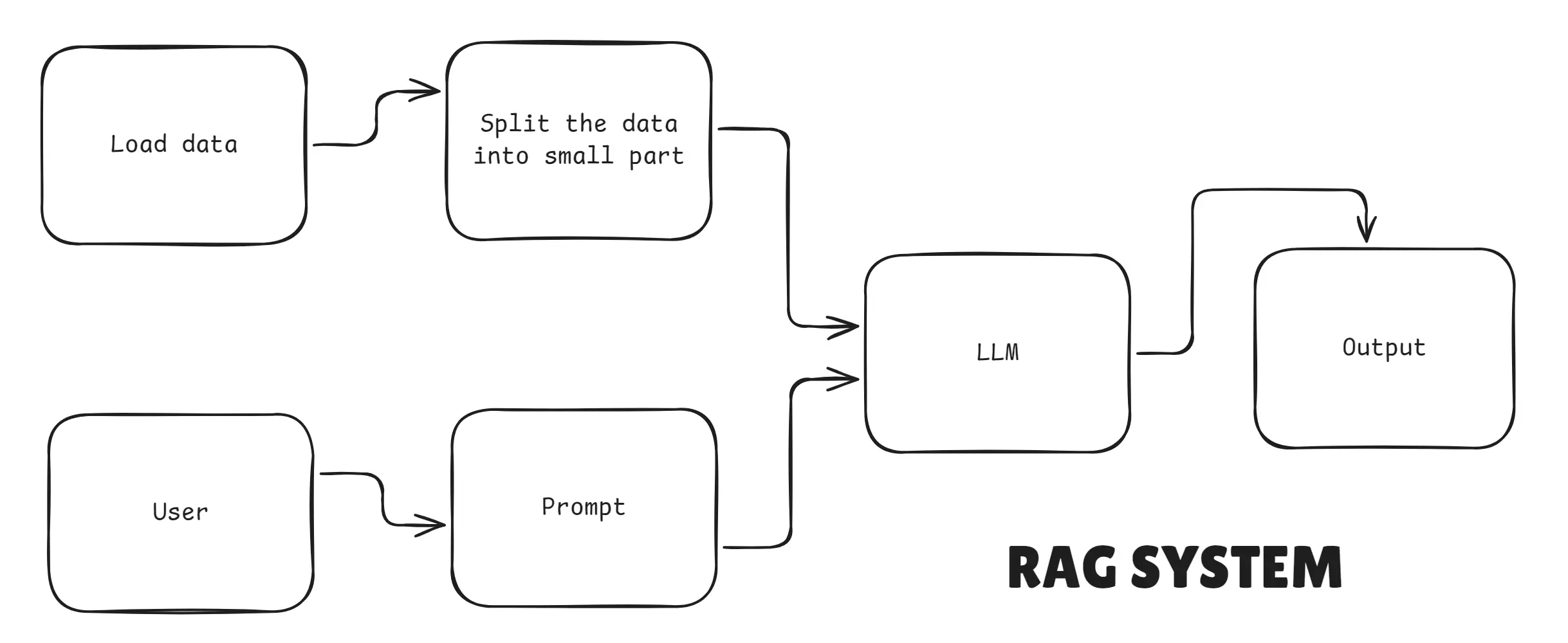
RAG connects Your data → Vector database → LLM
so the AI can give accurate, updated, and verifiable answers.
RAG Architecture
In this article, we will break down RAG in simple words and show how to build a real RAG system using:
- LangChain
- OpenAI
- Vector Databases
- Node.js
This guide is beginner-friendly, highly practical, and written in simple human language.
1. What is Retrieval-Augmented Generation (RAG) in AI?
Retrieval-Augmented Generation (RAG) is an architecture that improves LLM responses by combining two components:
- Retriever - finds relevant documents or passages from a large corpus (using semantic search / vector similarity).
- Generator - a large language model (LLM) that conditions its answer on the retrieved context (plus the user query).
Instead of asking the LLM to remember everything or store large documents in prompts, RAG fetches the most relevant pieces of information at query time and feeds them into the LLM. This leads to more factual, up-to-date, and context-specific answers.
What is Retrieval-Augmented Generation (RAG) in AI
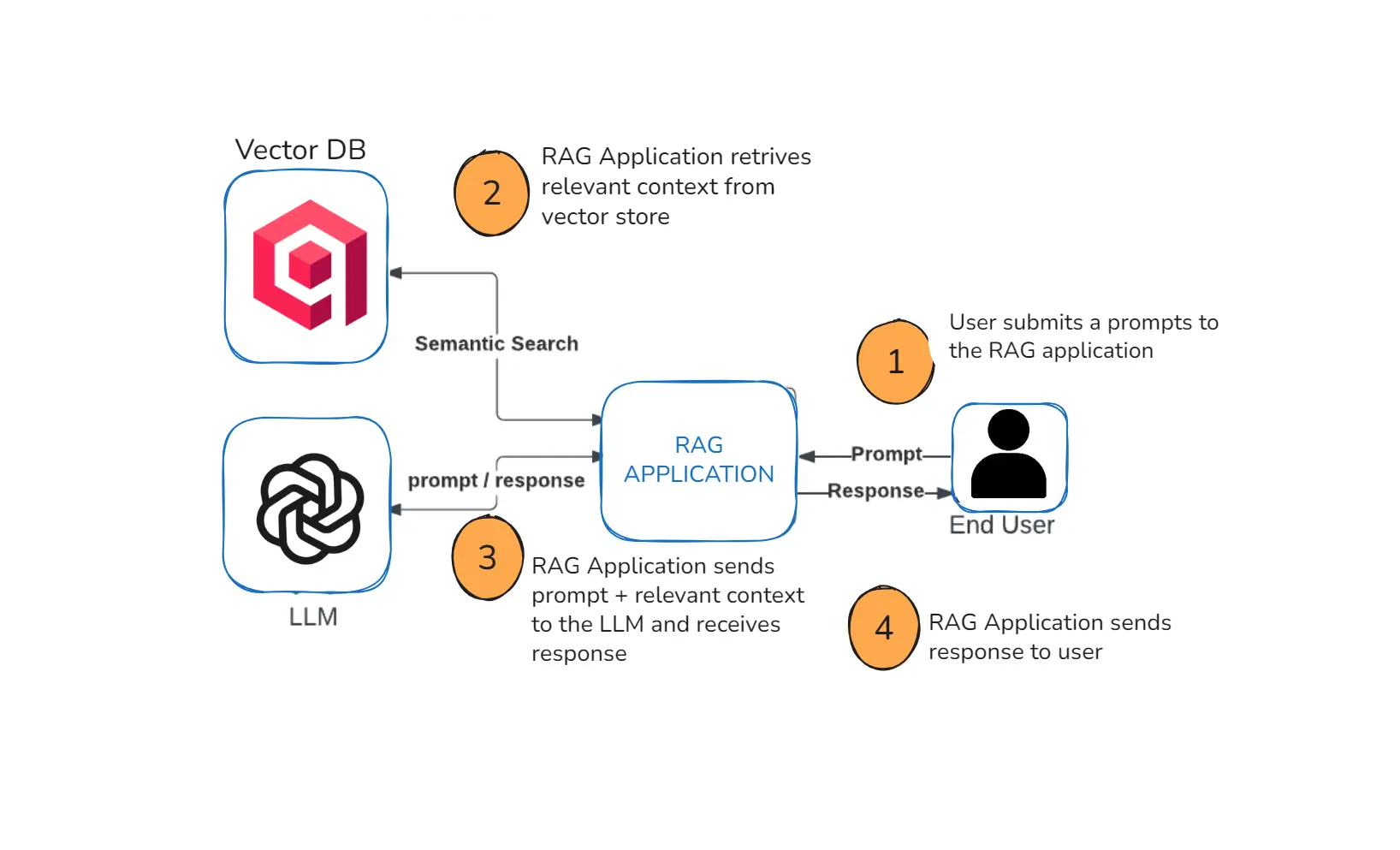
RAG (Retrieval-Augmented Generation) is an AI technique where the model first retrieves relevant information from a knowledge base (PDFs, documents, websites, databases) and then generates an answer using that information.
2. Why RAG is used in AI?
LLMs like GPT are powerful, but they only know what they were trained on. They don’t automatically know your company files, PDFs, websites, or new information.
RAG fixes that by allowing AI to:
- search your documents
- retrieve relevant information
- understand the context
- generate an accurate answer based on what it found
This makes the AI behave more like a real assistant that reads before answering.
RAG is used because it helps AI give correct, updated, and factual answers instead of guessing.
3. What is data indexing in RAG?
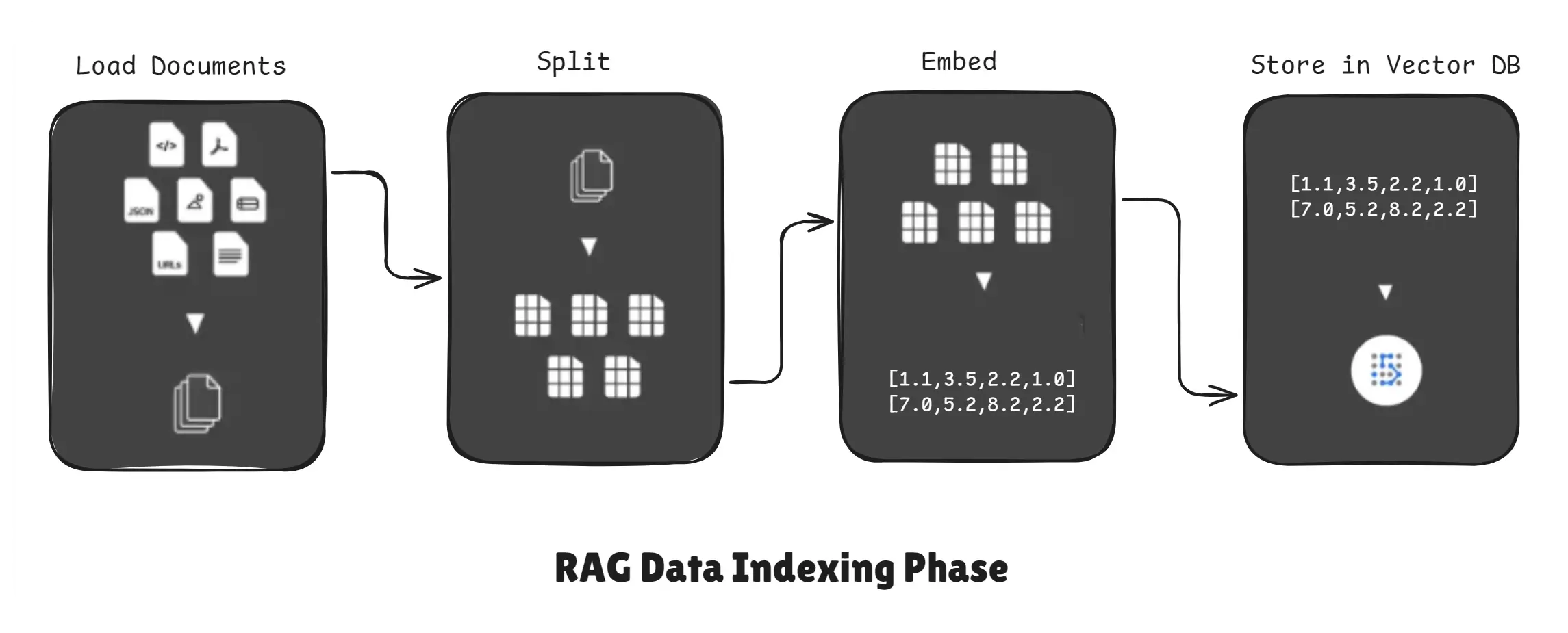
Data indexing in RAG is the process of preparing your documents so the AI can quickly find and retrieve the right information when needed.
It transforms raw text into a searchable format using embeddings and stores them in a vector database.
When you give PDFs, text files, notes, or website content to a RAG system, the AI cannot understand or search them directly. And so Indexing prepares raw data into a search-friendly format.
RAG Data Indexing Phase
Typical steps:
- Extract text from sources (PDFs, web pages, OCR, databases).
- Split text into chunks.
- Convert each chunk into a vector embedding (semantic representation).
- Store embeddings plus chunk metadata in a vector database (Qdrant, Pinecone, Milvus, etc.).
Indexing is usually done offline or periodically (not at every query), so retrieval becomes fast.
4. What is retrieval in RAG?
Retrieval in RAG is the process of finding and pulling the most relevant pieces of information from your vector database so the AI can use them to answer a question accurately.
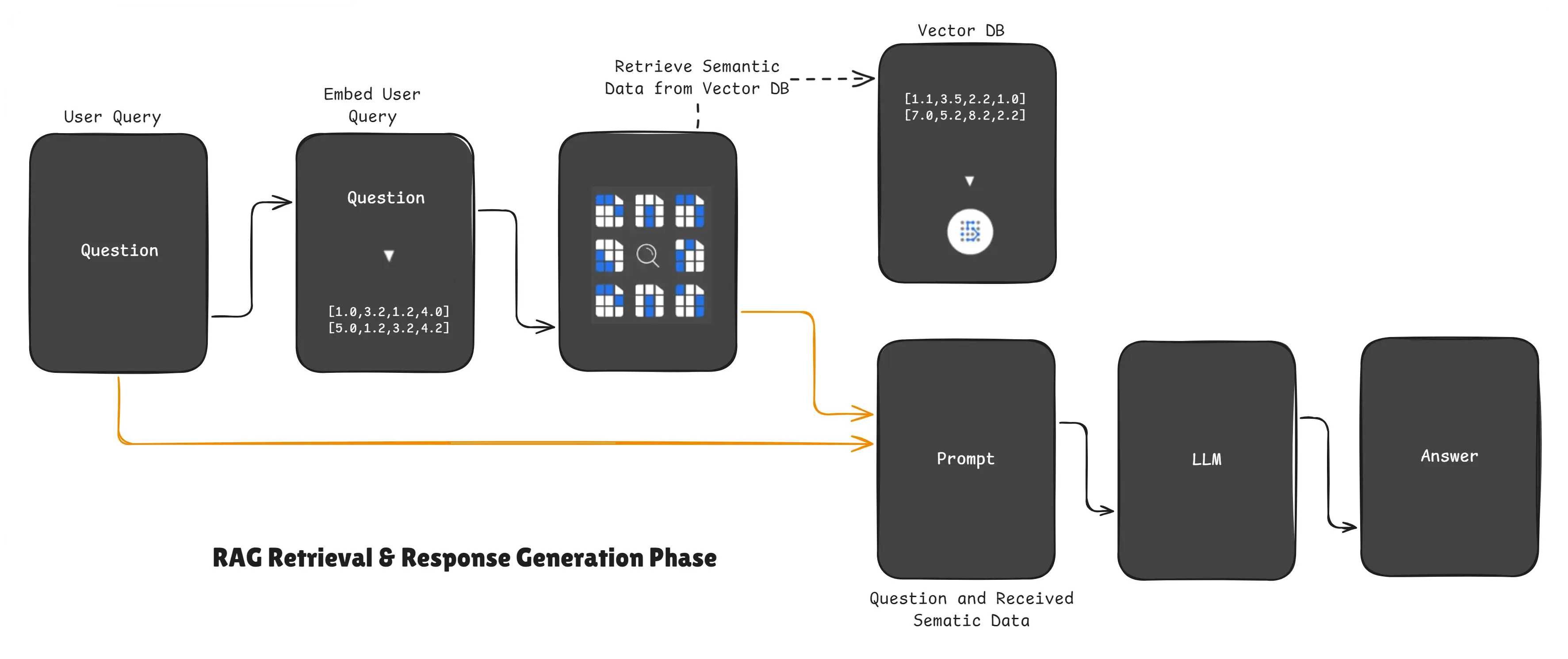
RAG Retrieval & Response Generation Phase
When a user asks a question, the RAG system does not guess.
Instead, it:
- Converts the user question into an embedding vector
- Searches the vector database
- Finds the closest matching chunks
- Sends those chunks to the LLM and user query
- The LLM uses the retrieved context to generate the answer
This step ensures the AI always answers based on real data, not assumptions.
5. How does RAG work technically?
We will illustrate three solution levels: Naive, Optimized, and Highly Optimized.
RAG System - Naive Solution
- Send the entire document corpus as system prompt context for every query.
- Problem: impractical for large corpora (e.g., 3K+ files), extremely slow and expensive.
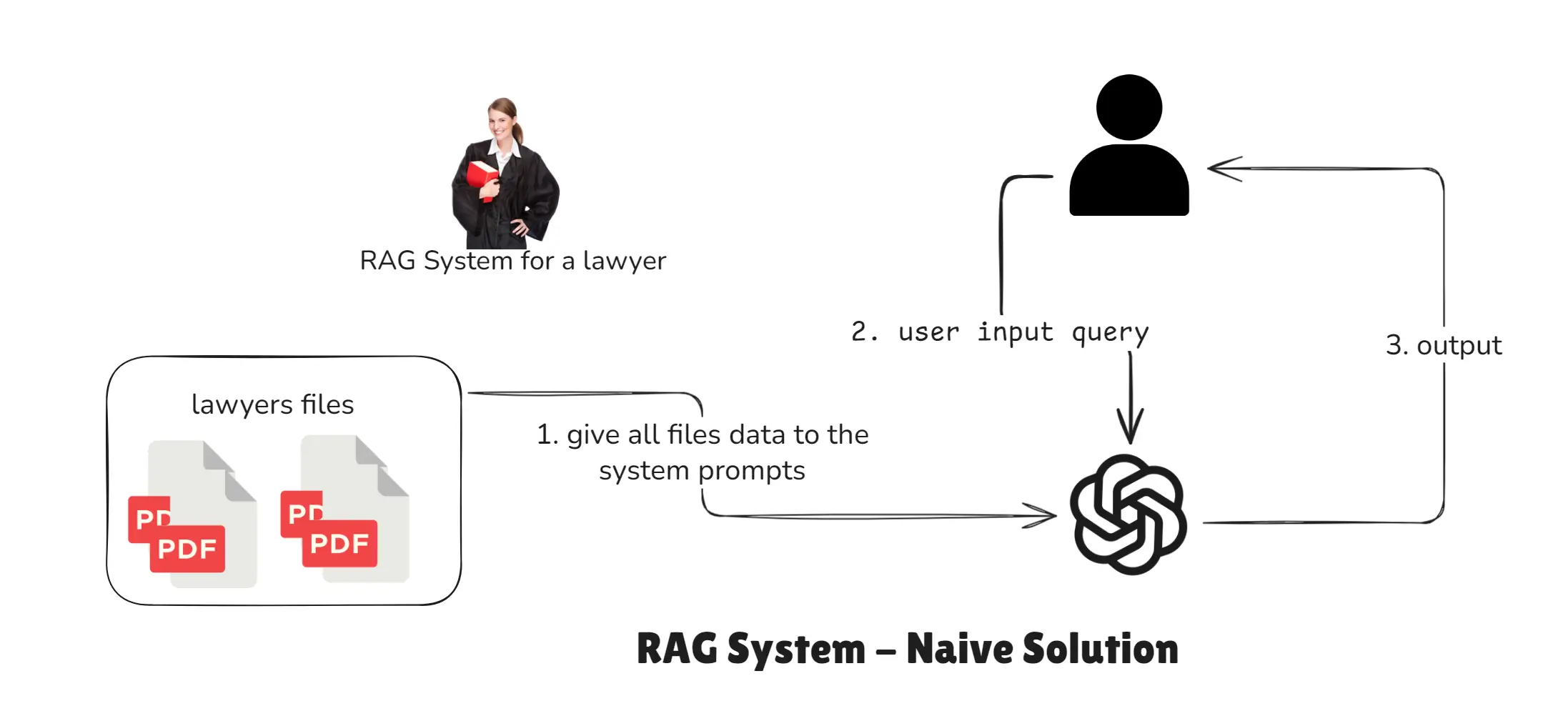
RAG NAIVE SOLUTION - How RAG works technically
Note: Suppose we have
3K+files so this is not a good approach for any RAG system.
RAG System - Optimized Solution
- Preprocess documents (chunk → embed → store).
- At query time, retrieve top-k chunks and pass them to the LLM as context.
- Much faster and cost-efficient than naive.
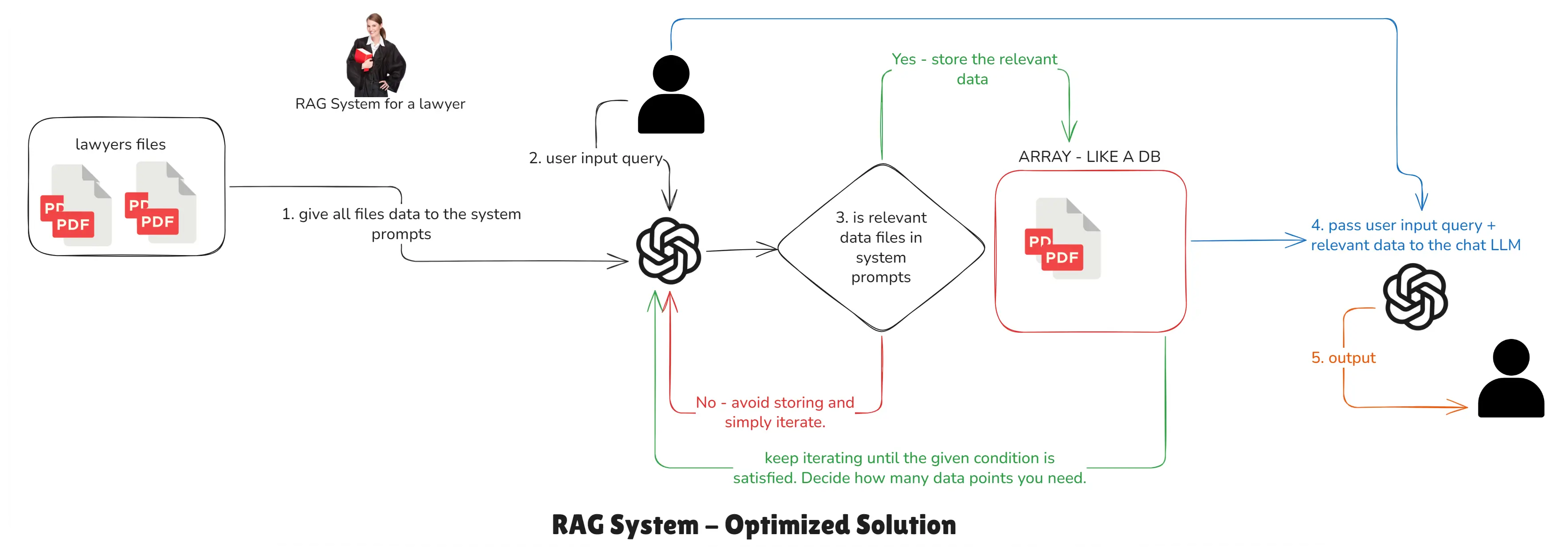
RAG OPTIMIZED SOLUTION - How RAG works technically
Note: Currently, every user query triggers classification of the data again and again. But if we pre-classify the data and store it, we can avoid repetitive looping and classification, and fetch relevant data much faster. This model is still not perfect, but it’s better than the previous one.
RAG System - Highly Optimized Solution
- Use careful chunking strategies and overlap, metadata tagging, fine-tuned embedding models, vector DB tuning (indexes, distance metrics), multi-stage retrieval, caching, and relevance scoring.
- Note: Even a simple RAG application requires fine-tuning multiple parameters, components, and models.
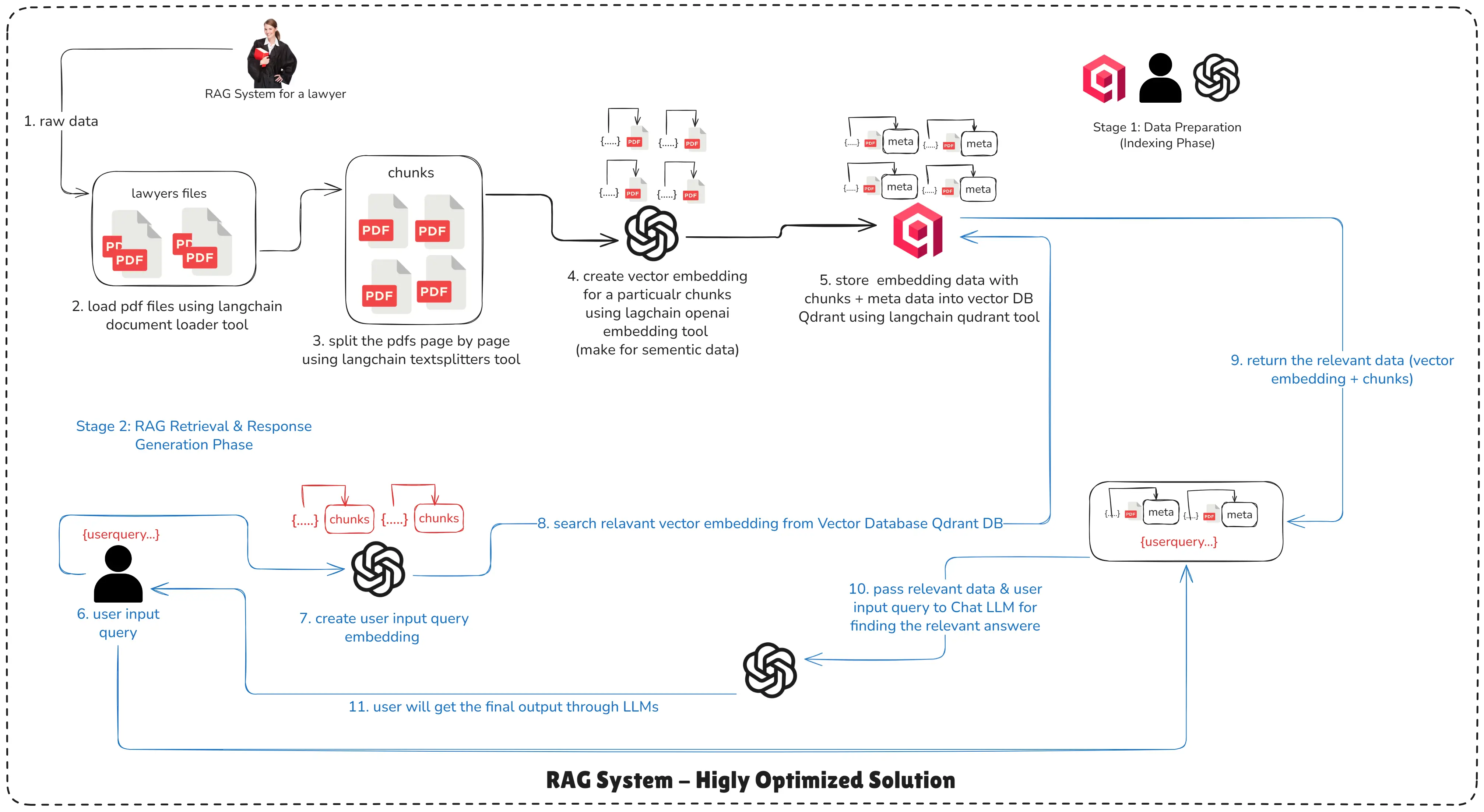
RAG HIGHLY OPTIMIZED SOLUTION - How RAG works technically
Stage 1: Data Preparation (Indexing Phase)
-
Step 1: Setup Raw Data Sources: Collect PDFs, docs, web pages, CSVs, or databases.
-
Step 2: Information Extraction: Run OCR (if images), PDF extraction, or web-scraping to convert to text.
-
Step 3: Chunking: Split text into sized chunks (e.g., 500–1,000 tokens) - possibly with overlap.
-
Step 4: Embedding (make for semantic data): Use an embedding model (e.g.,
text-embedding-3-large) to convert chunks into numeric vectors. -
Step 5: Store Embedding into Vector Database: Persist embeddings and chunk metadata in a vector DB (Qdrant / Pinecone / Milvus).
Stage 2: RAG Retrieval & Response Generation Phase
-
Step 6: User Input Query: User asks a question.
-
Step 7: Create User Input Query Embedding: Embed the user query with the same embedding model used during indexing.
-
Step 8: Search Relevant Embedding from Vector Database: Run similarity search and retrieve top-k chunks.
-
Step 9: Return the Relevant Data (vector embedding + chunks): Return chunk text and metadata to the application.
-
Step 10: Pass Relevant Data & User Input Query to Chat LLM(s): Construct a system prompt + user prompt that includes relevant chunks as context.
-
Step 11: User Get the Final Output through LLMs: LLM returns the final answer grounded on the retrieved chunks.
6. Why we perform RAG vectorization?
RAG vectorization is performed to convert text into numerical vectors so AI can understand meaning, compare similarity, and retrieve the most relevant information accurately.
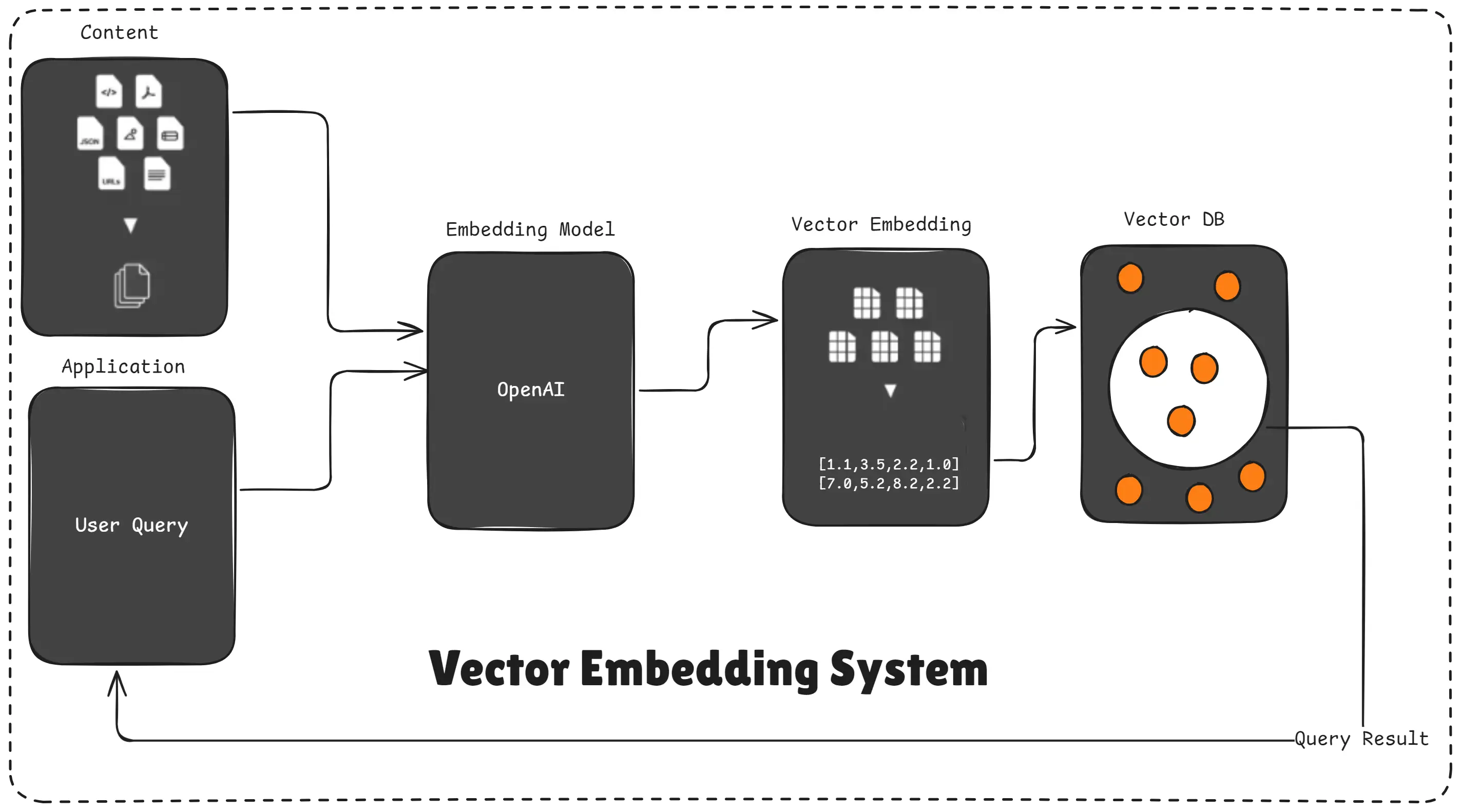
Vector Embedding System
AI cannot directly understand raw text in your PDFs, Word files, or website content.
So before the AI can retrieve anything, we must convert each chunk of text into embeddings.
These embeddings are just long lists of numbers that represent the meaning of the text.
Once vectorized, your entire dataset becomes:
- searchable
- comparable
- meaningful
- ready for semantic search
Without vectorization, the AI would have no way to know which part of your document is relevant to the user’s question.
7. Why RAGs exist?
RAG systems exist to solve the biggest limitation of LLMs: they cannot access real-time information, private documents, or updated knowledge.
RAG gives AI the ability to retrieve your data and generate accurate answers using it.
Analogy
Think of LLMs as students who learned a lot in school. RAG gives them a library they can access anytime, so they don’t have to rely only on memory, they can look up information before answering.
8. What is chunking in RAG systems?
Chunking in RAG systems is the process of breaking large documents into smaller, manageable text pieces so the AI can understand, embed, and retrieve information more accurately.
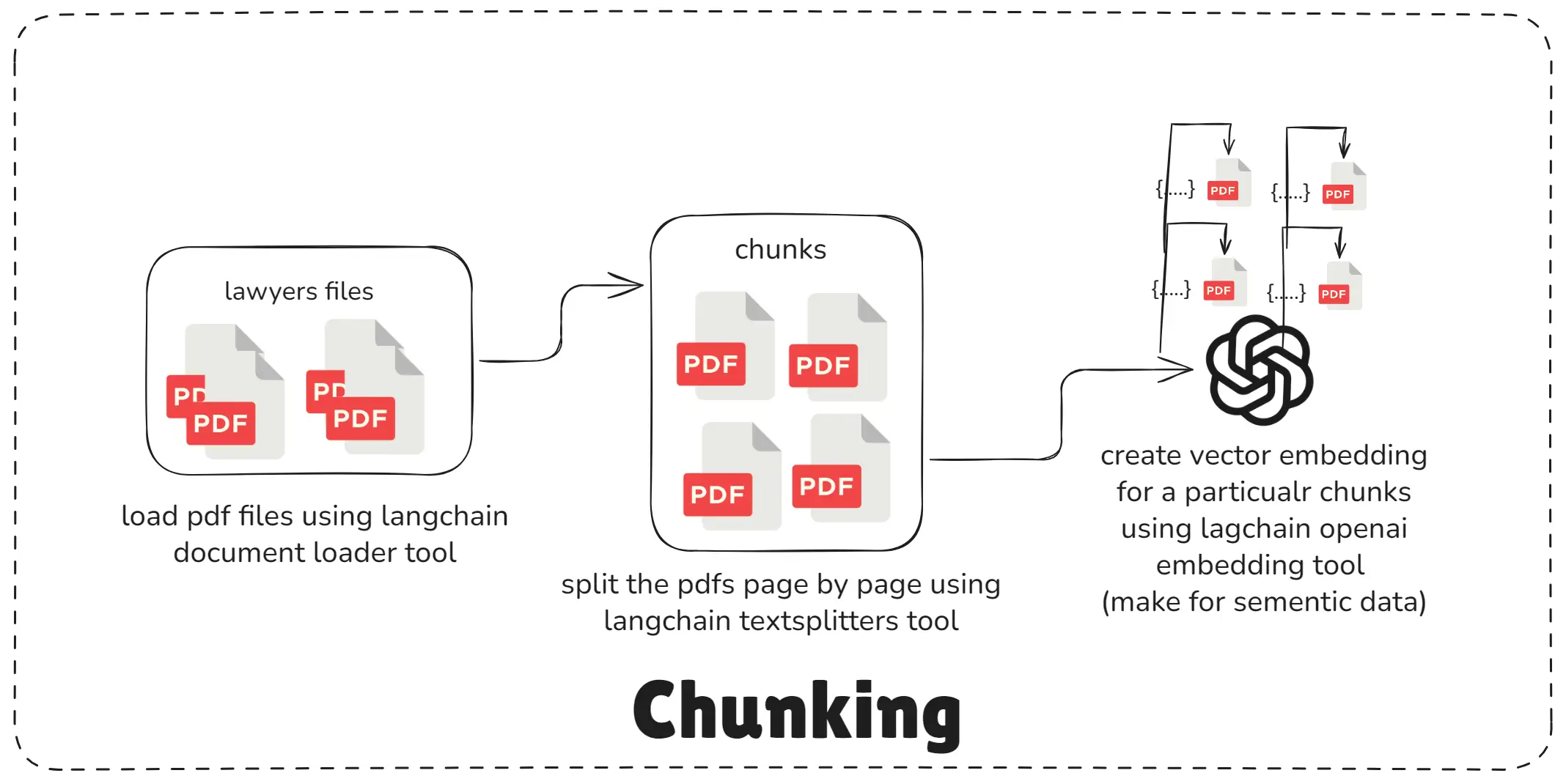
Chunking System
LLMs and embeddings work best with short, focused sections of text.
If you try to feed an entire PDF or long article at once:
- it becomes too large
- embeddings become less accurate
- retrieval becomes weaker
- AI may mix unrelated information
Chunking solves this.
You split your document into pieces like:
- 300 tokens
- 500 tokens
- 1,000 characters
Each chunk is separately converted into an embedding and stored in the vector database.
Later, when the user asks a question, the system retrieves only the most relevant chunks, not the entire document.
9. Why overlapping is used in chunking with RAG systems?
Overlapping is used in RAG chunking to make sure important context is not lost when a document is split into smaller chunks.
It helps the AI understand sentences or ideas that continue across two chunks.
Overlapping = adding a small repeated section between chunks so the AI doesn’t miss important meaning.
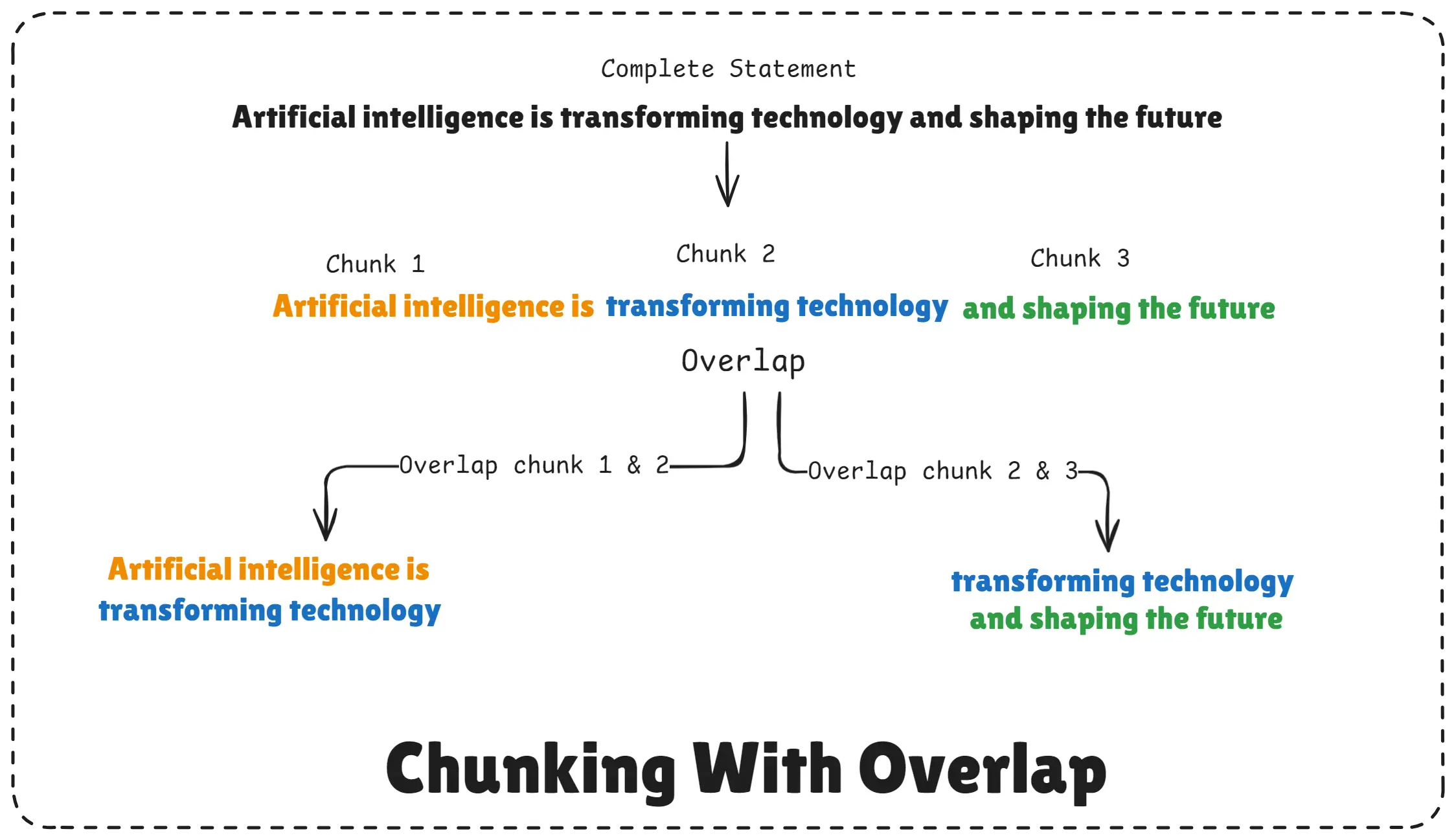
Chunking With Overlap
When a document is broken into chunks, some information naturally falls between two chunks.
For example, a paragraph may start in one chunk and end in the next.
If chunks don’t share overlapping content, the AI might:
- miss context
- misunderstand meaning
- give weaker answers
- retrieve the wrong chunk
So we add overlap, such as 50–100 characters or tokens, between each chunk.
This ensures smooth continuity and better understanding.
10. What is Langchain in AI?
LangChain is a powerful AI framework that helps developers build advanced applications like RAG systems, chatbots, agents, and workflow pipelines by connecting Large Language Models (LLMs) with external tools, data, and APIs.
It makes AI development easier, faster, and more modular.
LangChain = a toolkit that helps you connect AI models with your data, tools, and workflows.
LLMs like GPT are smart, but they can’t:
- Retrieve your documents
- Search databases
- Connect to APIs
- Process PDFs
- Run custom logic
LangChain solves this problem.
It provides ready-made components that plug your AI model into:
- Your documents
- Vector databases
- File loaders
- Retrieval systems
- Memory modules
- Custom tools
- APIs
- Chains and workflows
This makes it extremely powerful for building RAG applications, AI assistants, and multi-step reasoning systems.
11. What is vector database in AI?
A vector database is a special type of database that stores text, images, audio, or any data as numerical vectors (embeddings) so AI can search and compare them based on meaning, not keywords.
It is the core storage system used in RAG, semantic search, AI assistants, and recommendation systems.
A vector database is like a Google Search engine for meaning, not exact words. It lets AI find the most relevant information even if the user uses different wording.
This makes vector databases essential for:
- RAG systems
- Semantic search
- Chatbots with knowledge bases
- Document Q&A
- AI search tools (like Perplexity-style systems)
12. Build RAG system with Langchain, OpenAI, Vector Database and Node.js
Below is a minimal Node.js example (indexing + chat) using LangChain, Qdrant, and OpenAI embeddings / chat. Place these files in a project folder and follow the run steps.
Prerequisite: Docker (for Qdrant), Node 18+, OpenAI API key, and PDF in the project root.
File 1: index.js (RAG Indexing Phase Code)
import "dotenv/config";
import { PDFLoader } from "@langchain/community/document_loaders/fs/pdf";
import { RecursiveCharacterTextSplitter } from "@langchain/textsplitters";
import { OpenAIEmbeddings } from "@langchain/openai";
import { QdrantVectorStore } from "@langchain/qdrant";

const main = async () => {
  try {
    // Step 2: load the pdf data after raw data
    const pdfPath = "./nodejs.pdf";
    const loader = new PDFLoader(pdfPath);
    const docs = await loader.load();
    console.log("Pages loaded:", docs.length);

    // Step 3: split pdf data into chunks
    const splitter = new RecursiveCharacterTextSplitter({
      chunkSize: 10000,
      chunkOverlap: 1000,
    });
    const chunks = await splitter.splitDocuments(docs);
    console.log("Total chunks: ", chunks.length);
    console.log("First chunk: ", chunks[0]);

    // Step 4: create vector embedding for each chunks
    const embeddings = new OpenAIEmbeddings({
      apiKey: process.env.OPENAI_API_KEY,
      model: "text-embedding-3-large",
    });
    const vectorData = await embeddings.embedDocuments(
      chunks.map((chunk) => chunk.pageContent)
    );
    console.log("Total embeddings generated:", vectorData.length);
    console.log("Embedding for first chunk:", vectorData[0]);

    // Step 5: store documents(chunks) & embeddings inside vector DB Qdrant
    const vectorStore = await QdrantVectorStore.fromDocuments(
      chunks,
      embeddings,
      {
        url: "http://localhost:6333",
        collectionName: "notebookllm",
      }
    );

    console.log("Data successfully indexed into Qdrant...");
  } catch (err) {
    console.log(`Indexing error: ${err}`);
  }
};

main();
File 2: chat.js (RAG Chat Phase Code)
import "dotenv/config";
import { OpenAI } from "openai";
import { OpenAIEmbeddings } from "@langchain/openai";
import { QdrantVectorStore } from "@langchain/qdrant";

const openai = new OpenAI({
  apiKey: process.env.OPENAI_API_KEY,
});

const main = async () => {
  try {
	  // Step 6: user input query
    const userQuery =
      "please, can you tell me about the MongoDB hosting is what and why use?";

    // Step 7: create vector embedding for for user query
    const embeddings = new OpenAIEmbeddings({
      apiKey: process.env.OPENAI_API_KEY,
      model: "text-embedding-3-large",
    });

    // Step 8: search relevant vector embedding from vector Database Qdrant DB
    const vectorStore = await QdrantVectorStore.fromExistingCollection(
      embeddings,
      {
        url: "http://localhost:6333",
        collectionName: "notebookllm",
      }
    );

    // Step 9: retrieve relevant chunks from top 3 most relevant chunks for any query
    const vectorRetriver = vectorStore.asRetriever({
      k: 3,
    });
    const relevantChunks = await vectorRetriver.invoke(userQuery);

    // Step 6: user input query + retrieved semantic chunks
    const SYSTEM_PROMPT = `You are an AI assistant that answers questions based on the provided context available to you from a PDF file with the content and page number. Only answer based on the available context from file.

    Context: ${JSON.stringify(relevantChunks)}`;

    // Step 10: pass relevant data & user input query to chat LLM(s) to get the relevant answere
    const messagesHistory = [
      { role: "system", content: SYSTEM_PROMPT },
      { role: "user", content: userQuery },
    ];

    const response = await openai.chat.completions.create({
      model: "gpt-4.1-nano",
      messages: messagesHistory,
    });

    // Step 11: user get the final output through chat LLM
    console.log("Response:", response.choices[0].message.content);
  } catch (error) {
    console.log(`Reterival chat phase error: ${err}`);
  }
};

main();
File 3: docker-compose.yaml
version: '3.8'
services:
  qdrant:
    image: qdrant/qdrant
    ports:
      - "6333:6333"
    restart: unless-stopped
    volumes:
      - qdrant_storage:/qdrant/storage

volumes:
  qdrant_storage: {}
File 4: .env
OPENAI_API_KEY=your_openai_api_key_hereFile 5: package.json
{
  "name": "notebookllm",
  "version": "1.0.0",
  "type": "module",
  "main": "index.js",
  "scripts": {
    "index": "node indexing.js",
    "chat": "node chat.js"
  },
  "dependencies": {
    "@langchain/community": "^0.3.53",
    "@langchain/core": "^0.3.72",
    "@langchain/openai": "^0.6.9",
    "@langchain/qdrant": "^0.1.3",
    "@langchain/textsplitters": "^0.1.0",
    "dotenv": "^17.2.1",
    "openai": "^5.12.2",
    "pdf-parse": "^1.1.1"
  }
}
File 6: .gitignore
node_modules
.env
How to run (local quickstart)
- Start Qdrant:
docker compose up -d- Install dependencies:
npm install- Index the PDF:
npm run index- Run the chat example:
npm run chatNote: LangChain and client library APIs evolve. If you see API mismatches, check your installed package docs - e.g., methods for retrieval may be
.invoke(),.getRelevantDocuments(), or.similaritySearch()depending on version.
Conclusion
RAG is one of the most important technologies in modern AI.
It connects powerful LLMs with your real, private, and updated data, making AI more accurate, trustworthy, and useful.
In this article, you learned:
- What RAG is
- How chunking, embeddings, and vector DBs work
- Why overlapping is important
- How retrieval and indexing work internally
- How to build a real RAG system using LangChain, OpenAI, and Node.js
RAG is the backbone of intelligent AI apps like:
- Chatbots that understand your documents
- AI assistants for companies
- Knowledge search engines
- Personalized learning systems
- Business workflow automation
Once you understand RAG, you can build almost any real-world AI application.
Happy Building with RAG!