Learning to Build AI Agents Using OpenAI Agents SDK: A Practical Guide
In the previous article, we clearly understood what OpenAI Agents SDK is, why it exists, and how it is different from tools like LangGraph. We learned that OpenAI Agents SDK focuses on autonomous execution, where agents can decide what to do, which tools to use, and when to stop, without us manually controlling every step.
Building AI Agents Using OpenAI Agents SDK
In this article, we move one step forward. Here, the focus is building real AI agents using OpenAI Agents SDK. You will see how agents are created, how they run, and how the SDK supports both simple text-based agents and real-time interactive agents like voice assistants (we will cover later).
This article is fully practical and example-driven, so you can clearly understand how real-world AI agents are built using the OpenAI Agents SDK.
Basic Rules of OpenAI Agents SDK
When building agents with OpenAI Agents SDK, the idea is very simple: one agent, one responsibility. Each agent is created for a specific task and is given only the tools it actually needs.
First, you create an agent and define its role, such as cooking assistant, receptionist, or storyteller. Then, you decide how the agent will be used.
For simple use cases like chat or text responses, the agent is run using a Runner.
import { Agent, run } from '@openai/agents';

const agent = new Agent({
  name: 'Assistant',
  instructions: 'You are a helpful assistant.',
});

const result = await run(
  agent,
  'Write a haiku about recursion in programming.',
);

console.log(result.finalOutput);
For live and interactive use cases like voice, calls, or continuous conversations, the agent runs inside a Realtime Session.
import { RealtimeAgent, RealtimeSession } from '@openai/agents/realtime';

const agent = new RealtimeAgent({
  name: 'Assistant',
  instructions: 'You are a helpful assistant.',
});

// Automatically connects your microphone and audio output in the browser via WebRTC.
const session = new RealtimeSession(agent);
await session.connect({
  apiKey: '<client-api-key>',
});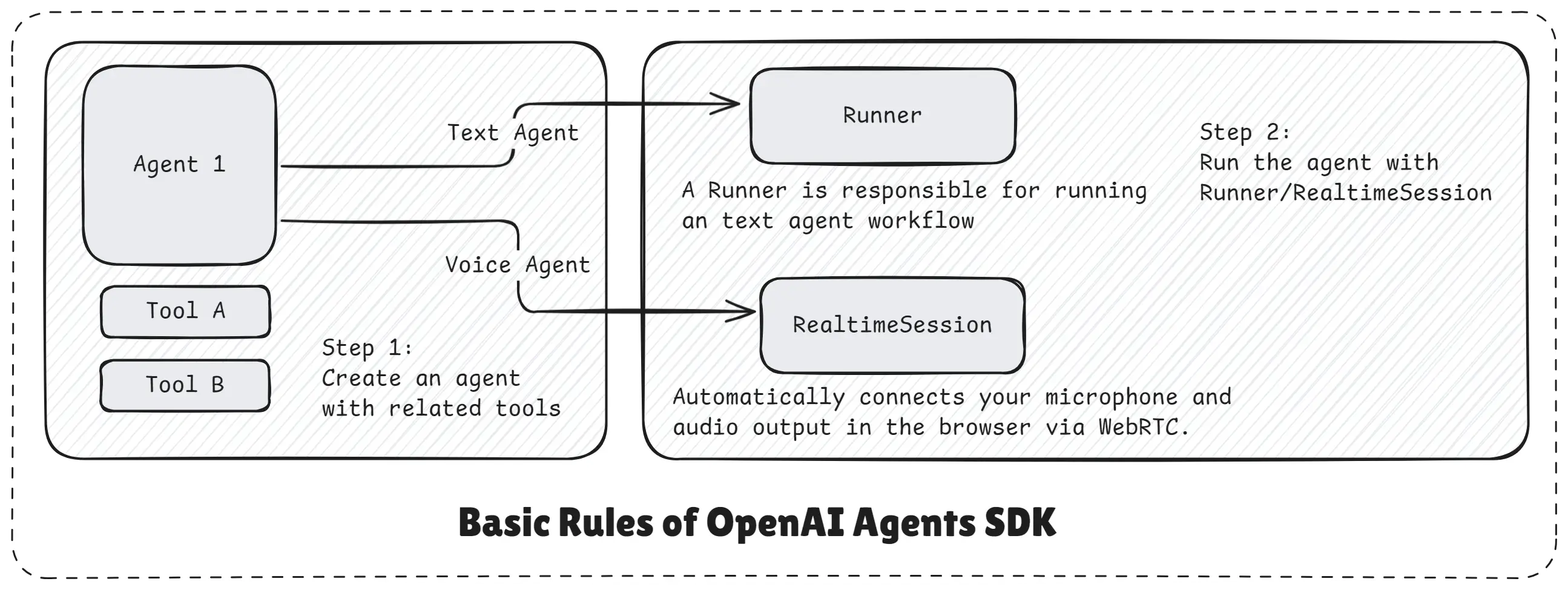
Basic Rules of OpenAI Agents SDK
The image above explains this clearly. The agent sits at the center with its tools. On one side, the Runner handles text-based workflows. On the other side, the Realtime Session manages voice, audio, and live interactions automatically using technologies like WebRTC.
The important part is that you do not manage the flow manually. The SDK handles execution, decisions, and tool usage internally.
Building a Specialized Cooking Assistant
In this example, we build a specialized cooking assistant using the OpenAI Agents SDK. The goal is to show how an agent can be designed for one clear responsibility and how tools help the agent deliver accurate, contextual answers instead of guessing.
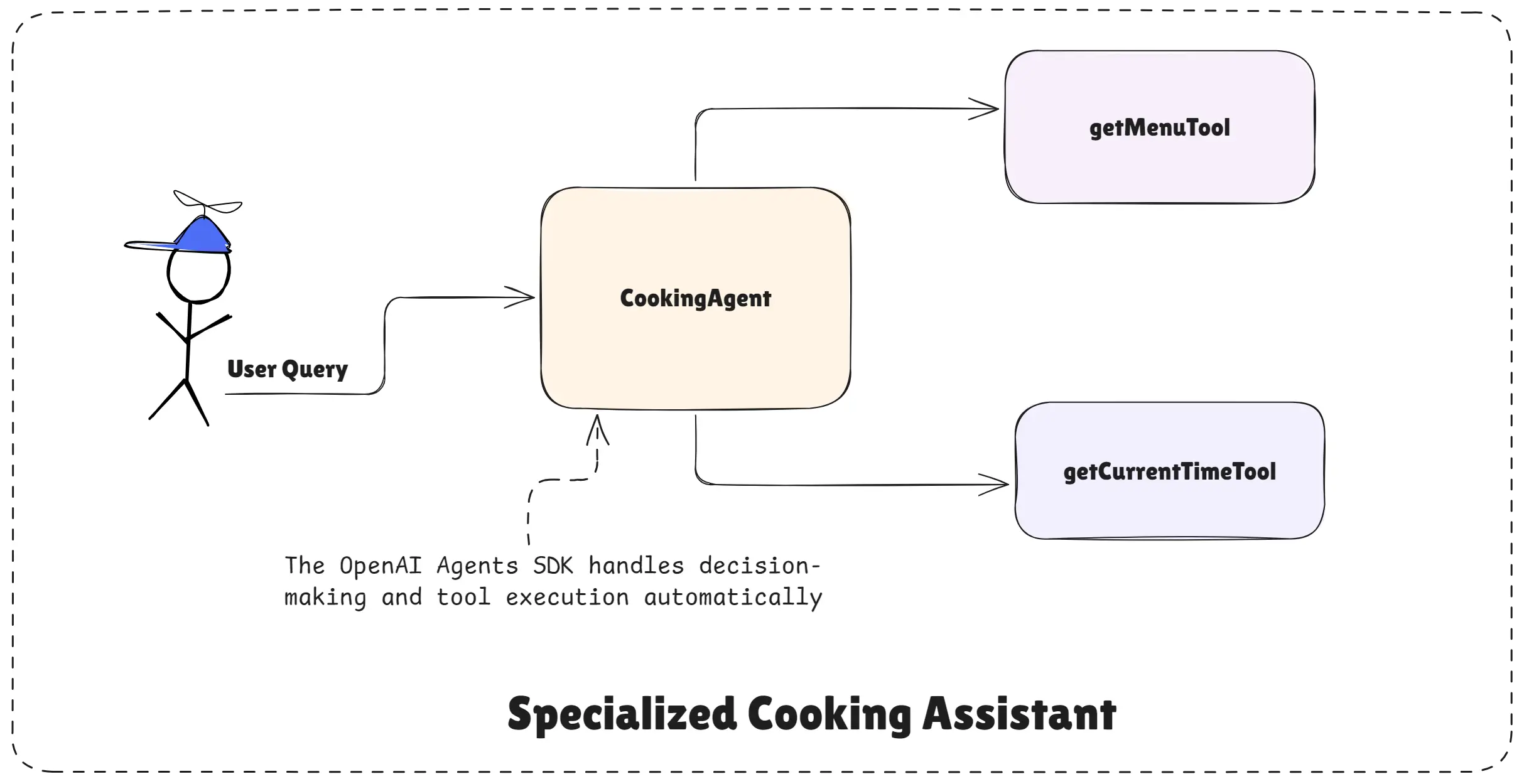
Specialized Cooking Assistant
This cooking agent is not a general chatbot. It is intentionally limited to cooking and restaurant-related tasks. This focus is what makes agents reliable and production-ready.
What This Cooking Agent Is Designed To Do
This agent acts like a personal cooking helper. It can guide users while cooking at home, suggest meals, and also help with restaurant-related questions like menus and prices.
The agent understands:
- Recipes and step-by-step cooking instructions
- Cooking tips and best practices
- Meal ideas based on preferences
- Restaurant menus and dish prices
- Time-based meal suggestions (breakfast, lunch, dinner)
If a user asks something outside this scope, the agent politely refuses. This behavior is intentional and important for safety and clarity.
Step 1: Creating Tools for the Agent
Tools give the agent real capabilities beyond text generation.
import "dotenv/config";
import { tool } from "@openai/agents";
import { z } from "zod";

// Tool to get the current time
const getCurrentTimeTool = tool({
  name: "get_current_time",
  description: "This tool returns the current date and time as a string.",
  parameters: z.object({}),
  execute: async () => {
    return new Date().toString();
  },
});
The first tool returns the current date and time. This is useful when the agent needs to suggest meals based on the time of day, such as breakfast in the morning or dinner at night. Instead of guessing, the agent calls this tool to get accurate information.
import "dotenv/config";
import { tool } from "@openai/agents";
import { z } from "zod";

// Tool to get the manu
const getMenuTool = tool({
  name: "get_menu",
  description:
    "This tool fethes and returns the menu of a restaurant given its name.",
  parameters: z.object({
    restaurant_name: z.string().describe("The name of the restaurant"),
  }),
  execute: async ({ restaurant_name }) => {
    const menu = {
      "restaurant a": [
        {
          Drinks: {
            Chai: "INR 50",
            Coffee: "INR 70",
          },
          Veg: {
            DalMakhni: "INR 250",
            Panner: "INR 400",
          },
        },
      ],
      "restaurant b": [
        {
          Drinks: {
            Lemonade: "INR 40",
            Mojito: "INR 120",
            Lahori: "INR 150",
          },
          NonVeg: {
            ChickenCurry: "INR 350",
            MuttonBiryani: "INR 500",
          },
          Veg: {
            VegBiryani: "INR 300",
            MixVeg: "INR 200",
          },
        },
      ],
    };
    return (
      menu[restaurant_name.toLowerCase()] ||
      "Menu not found for this restaurant."
    );
  },
});
The second tool fetches a restaurant menu. Given a restaurant name, the tool returns drinks, veg items, non-veg items, and their prices. This allows the agent to answer questions like menu details, dish prices, and recommendations directly from structured data.
These tools turn the agent from a talking assistant into a functional helper.
Step 2: Creating the Cooking Agent
The cooking agent is created with:
- A clear name that defines its role
- A lightweight model for fast responses
- A fixed set of tools related only to cooking and menus
- Detailed instructions that define behavior and boundaries
The instructions are the most important part. They clearly tell the agent:
- What it is allowed to help with
- When to use tools
- How to respond to cooking questions
- How to handle restaurant-related queries
- How to refuse unrelated questions politely
This makes the agent predictable and easy to trust.
import "dotenv/config";
import { Agent, tool, run } from "@openai/agents";
import { z } from "zod";

// Create the cooking agent
export const cookingAgent = new Agent({
  name: "Cooking Agent",
  model: "gpt-4.1-mini",
  tools: [getCurrentTimeTool, getMenuTool],
  instructions: `
    You are a cooking assistant who is speacialized in cooking food.
    Help users with recipes, cooking tips, and meal ideas. Always help them to cook the
    foods they want to cook.

    Your Responsibilities for Cooking-Related Queries:
    If the user asks for a recipe, provide a detailed recipe with ingredients
    and step-by-step instructions.
    If the user asks for cooking tips, provide useful and practical advice.
    If the user asks for meal ideas, suggest creative and delicious meal options based
    on their preferences and dietary restrictions.

    Your Responsibilities for Restaurant Menu Queries:
    If the user asks for the menu of a restaurant, use the get_menu tool to fetch the
    menu.
    If the user asks for the price of a specific dish or drink in a restaurant, use the
    get_menu tool to fetch the menu and provide the price.
    If the user asks for recommendations based on the menu, use the get_menu tool to
    fetch the menu and suggest dishes or drinks.
    If the user asks for the current time to suggest a meal, use the get_current_time
    tool to fetch the current time and suggest a meal accordingly.

    Important Notes:
    If the user asks for something unrelated to cooking or restaurant
    menus, politely inform them that you can only assist with cooking
    and restaurant menu-related queries.
    Always use the provided tools to fetch real-time information when needed.

    Tone and Style:
    Always respond in a friendly and helpful manner.
    Use clear and concise language that is easy to understand.`,
});
Step 3: Running the Agent
The agent is executed using the runner function. This is ideal for text-based interactions such as chat apps, APIs, or backend services.
You pass a user query to the runner, and the SDK:
- Runs the agent
- Lets it decide whether tools are needed
- Executes tools safely
- Returns the final response
You also get access to the conversation history and the final output, which is helpful for debugging and logging.
import "dotenv/config";
import { run } from "@openai/agents";
import { z } from "zod";

// Run the agent with runner
const chatWithCookingAgent = async (query) => {
  const result = await run(cookingAgent, query);
  console.log("History :", result.history);
  console.log("Final Output :", result.finalOutput);
};

// Example usage
chatWithCookingAgent(
  "In Restaurant B, what is good to eat and drink based on current time?"
);
Complete Code of Specialized Cooking Assistant
import "dotenv/config";
import { Agent, tool, run } from "@openai/agents";
import { z } from "zod";

// Step 1: Create an agent with these tools

// Tool to get the current time
const getCurrentTimeTool = tool({
  name: "get_current_time",
  description: "This tool returns the current date and time as a string.",
  parameters: z.object({}),
  execute: async () => {
    return new Date().toString();
  },
});

// Tool to get the manu
const getMenuTool = tool({
  name: "get_menu",
  description:
    "This tool fethes and returns the menu of a restaurant given its name.",
  parameters: z.object({
    restaurant_name: z.string().describe("The name of the restaurant"),
  }),
  execute: async ({ restaurant_name }) => {
    const menu = {
      "restaurant a": [
        {
          Drinks: {
            Chai: "INR 50",
            Coffee: "INR 70",
          },
          Veg: {
            DalMakhni: "INR 250",
            Panner: "INR 400",
          },
        },
      ],
      "restaurant b": [
        {
          Drinks: {
            Lemonade: "INR 40",
            Mojito: "INR 120",
            Lahori: "INR 150",
          },
          NonVeg: {
            ChickenCurry: "INR 350",
            MuttonBiryani: "INR 500",
          },
          Veg: {
            VegBiryani: "INR 300",
            MixVeg: "INR 200",
          },
        },
      ],
    };
    return (
      menu[restaurant_name.toLowerCase()] ||
      "Menu not found for this restaurant."
    );
  },
});

// Step 2: Create the cooking agent
export const cookingAgent = new Agent({
  name: "Cooking Agent",
  model: "gpt-4.1-mini",
  tools: [getCurrentTimeTool, getMenuTool],
  instructions: `
    You are a cooking assistant who is speacialized in cooking food.
    Help users with recipes, cooking tips, and meal ideas. Always help them to cook the
    foods they want to cook.

    Your Responsibilities for Cooking-Related Queries:
    If the user asks for a recipe, provide a detailed recipe with ingredients
    and step-by-step instructions.
    If the user asks for cooking tips, provide useful and practical advice.
    If the user asks for meal ideas, suggest creative and delicious meal options based
    on their preferences and dietary restrictions.

    Your Responsibilities for Restaurant Menu Queries:
    If the user asks for the menu of a restaurant, use the get_menu tool to fetch the
    menu.
    If the user asks for the price of a specific dish or drink in a restaurant, use the
    get_menu tool to fetch the menu and provide the price.
    If the user asks for recommendations based on the menu, use the get_menu tool to
    fetch the menu and suggest dishes or drinks.
    If the user asks for the current time to suggest a meal, use the get_current_time
    tool to fetch the current time and suggest a meal accordingly.

    Important Notes:
    If the user asks for something unrelated to cooking or restaurant
    menus, politely inform them that you can only assist with cooking
    and restaurant menu-related queries.
    Always use the provided tools to fetch real-time information when needed.

    Tone and Style:
    Always respond in a friendly and helpful manner.
    Use clear and concise language that is easy to understand.`,
});

// Step 3: Run the agent with runner (text input/chat input)
const chatWithCookingAgent = async (query) => {
  const result = await run(cookingAgent, query);
  console.log("History :", result.history);
  console.log("Final Output :", result.finalOutput);
};

// Example usage
chatWithCookingAgent(
  "In Restaurant B, what is good to eat and drink based on current time?"
);
How the Agent Thinks and Acts
When a user sends a message, the agent first understands the intent.
If the user asks for a recipe, the agent responds directly with ingredients and steps.
If the user asks for a restaurant menu or dish price, the agent automatically calls the menu tool, retrieves the data, and then explains it in a friendly way.
If the user asks what they should eat right now, the agent calls the time tool and suggests a suitable meal.
The developer does not manually control this logic. The OpenAI Agents SDK handles decision-making and tool execution automatically.
Why This Example Matters
This cooking assistant shows the real strength of the OpenAI Agents SDK.
You are not writing complex workflows, routing rules, or condition checks. You are simply:
- Defining a role
- Attaching tools
- Writing clear instructions
The SDK handles everything else.
This is how you should think about building agents: small, focused, tool-powered, and easy to reason about.
In the next examples, this same pattern can be extended to receptionist agents, planner agents, streaming agents, and even multi-agent systems where one agent uses another as a tool.
Key Takeaway
This example shows that powerful AI agents are built by giving them one clear job and the right tools. The cooking agent does not guess or overreach. It follows its role, uses tools when needed, and politely refuses unrelated requests.
The OpenAI Agents SDK makes this easy by handling reasoning, tool usage, and flow automatically. You focus on defining the agent, not controlling every step. This is the right way to build reliable, production-ready AI agents.
In next articles, we will build a Receptionist Agent and explore more advanced use cases like streaming and multi-agent handoffs.
Happy agent building with OpenAI Agents SDK!