Building an AI Agent as a Tool using OpenAI Agents SDK: Agent-to-Agent Collaboration
In most real-world AI systems, we usually handoff a user query from one agent to another. But sometimes, you don’t want a full handoff. Sometimes, you want one agent to help another agent quietly in the background, just like a helper.
Agent As A Tool.webp
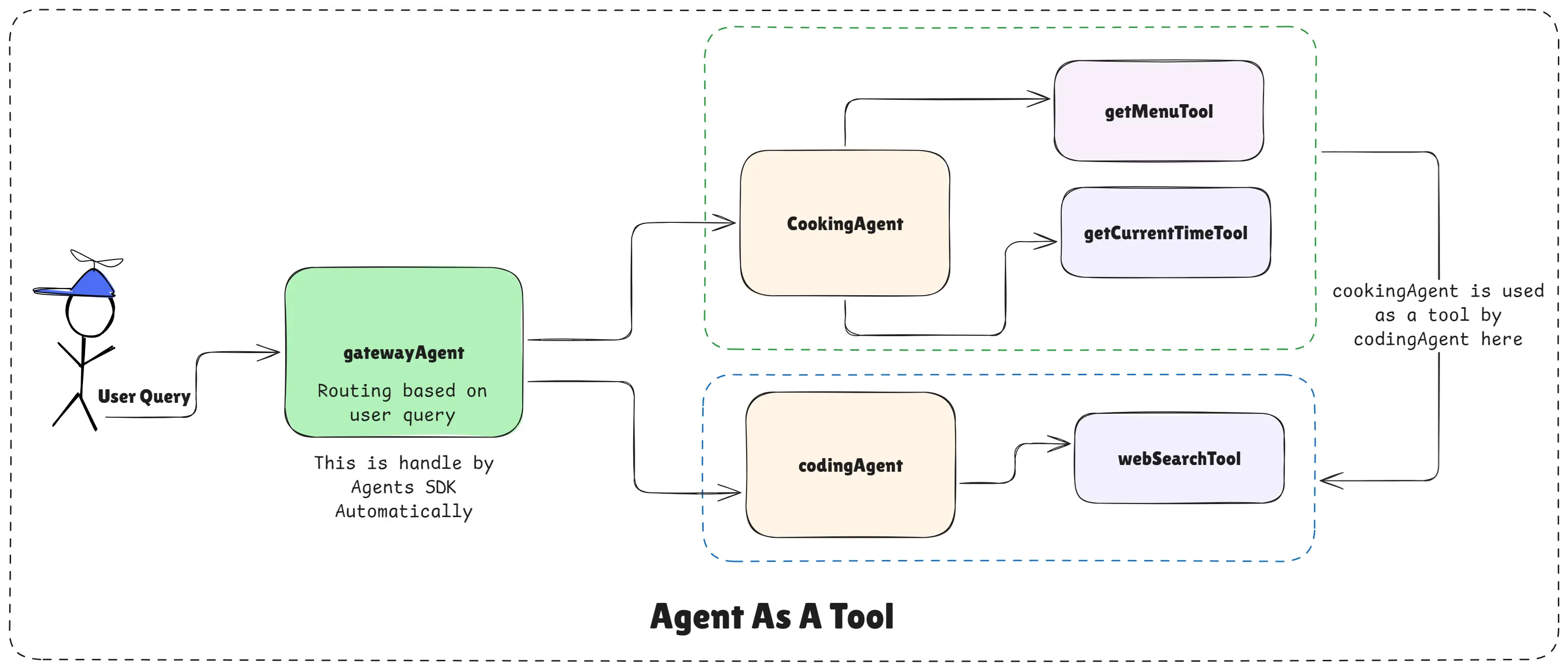
This example shows how one agent (Cooking Agent) can be used as a tool by another agent (Coding Agent) using the OpenAI Agents SDK. This is a powerful concept, even though it’s not commonly used in production today.
What Does “Agent as a Tool” Mean?
Cooking Agent Used as a Tool by a Coding Agent
Normally, tools are simple functions like:
- Getting weather
- Searching the web
- Fetching data
But in the OpenAI Agents SDK, an agent itself can become a tool. That means:
- The main agent stays in control of the conversation
- The helper agent answers only when needed
- The user never feels the handoff
In this case:
- Coding Agent is the main agent
- Cooking Agent works silently as a tool
Why Would You Do This?
Imagine a user asks a mixed question like:
“I’m coding a food app. Can you show me Restaurant A’s menu?”
This is mostly a coding conversation, but it briefly needs cooking or menu knowledge.
Instead of fully switching agents, the coding agent can:
- Stay active
- Call the cooking agent only for food-related data
- Continue the response smoothly
This keeps the conversation consistent and controlled.
Step 1: Convert the Cooking Agent into a Tool
Here, the cooking agent is wrapped as a tool using asTool().
This means:
- The cooking agent does not take over the conversation
- It only responds when the coding agent explicitly calls it
// cooking-agent.js
import "dotenv/config";
import { Agent, tool } from "@openai/agents";
import { z } from "zod";

// Create a specialized Cooking Agent
const getCurrentTimeTool = tool({
  name: "get_current_time",
  description: "This tool returns the current date and time as a string.",
  parameters: z.object({}),
  execute: async () => {
    return new Date().toString();
  },
});

const getMenuTool = tool({
  name: "get_menu",
  description:
    "This tool fethes and returns the menu of a restaurant given its name.",
  parameters: z.object({
    restaurant_name: z.string().describe("The name of the restaurant"),
  }),
  execute: async ({ restaurant_name }) => {
    const menu = {
      "restaurant a": [
        {
          Drinks: {
            Chai: "INR 50",
            Coffee: "INR 70",
          },
          Veg: {
            DalMakhni: "INR 250",
            Panner: "INR 400",
          },
        },
      ],
      "restaurant b": [
        {
          Drinks: {
            Lemonade: "INR 40",
            Mojito: "INR 120",
            Lahori: "INR 150",
          },
          NonVeg: {
            ChickenCurry: "INR 350",
            MuttonBiryani: "INR 500",
          },
          Veg: {
            VegBiryani: "INR 300",
            MixVeg: "INR 200",
          },
        },
      ],
    };
    return (
      menu[restaurant_name.toLowerCase()] ||
      "Menu not found for this restaurant."
    );
  },
});

export const cookingAgent = new Agent({
  name: "Cooking Agent",
  model: "gpt-4.1-mini",
  tools: [getCurrentTimeTool, getMenuTool],
  instructions: `
    You are a cooking assistant who is speacialized in cooking food.
    Help users with recipes, cooking tips, and meal ideas. Always help them to cook the
    foods they want to cook.

    Your Responsibilities for Cooking-Related Queries:
    If the user asks for a recipe, provide a detailed recipe with ingredients
    and step-by-step instructions.
    If the user asks for cooking tips, provide useful and practical advice.
    If the user asks for meal ideas, suggest creative and delicious meal options based
    on their preferences and dietary restrictions.

    Your Responsibilities for Restaurant Menu Queries:
    If the user asks for the menu of a restaurant, use the get_menu tool to fetch the
    menu.
    If the user asks for the price of a specific dish or drink in a restaurant, use the
    get_menu tool to fetch the menu and provide the price.
    If the user asks for recommendations based on the menu, use the get_menu tool to
    fetch the menu and suggest dishes or drinks.
    If the user asks for the current time to suggest a meal, use the get_current_time
    tool to fetch the current time and suggest a meal accordingly.

    Important Notes:
    If the user asks for something unrelated to cooking or restaurant
    menus, politely inform them that you can only assist with cooking
    and restaurant menu-related queries.
    Always use the provided tools to fetch real-time information when needed.

    Tone and Style:
    Always respond in a friendly and helpful manner.
    Use clear and concise language that is easy to understand.
    `,
});
// cooking-agent-as-tool.js
import { cookingAgent } from "./cooking-agent.js";
// Create the agent as a tool
export const cookingAgentAsTool = cookingAgent.asTool({
name:"cooking_agent_as_tool",
description:
"This tool handles cooking-related queries and restaurant menu inquiries.",
});At this point, the cooking agent behaves just like any other tool.
Step 2: Create the Coding Agent and Attach the Cooking Agent Tool
Now the coding agent is created. It has:
- A web search tool for JavaScript (MDN)
- The cooking agent tool for food-related questions
// coding-agent.js
import "dotenv/config";
import { Agent, webSearchTool } from "@openai/agents";
import { cookingAgentAsTool } from "./cooking-agent-as-tool.js";

// Create the coding agent
export const codingAgent = new Agent({
  name: "Coding Agent",
  tools: [
    webSearchTool("https://developer.mozilla.org/en-US"),
    cookingAgentAsTool,
  ],
  instructions: `
        You are a coding assistant particularly skilled in JavaScript. You can help users with coding-related queries, including writing code snippets, debugging, and explaining programming concepts.

        Your Responsibilities:
        1. Understand the user's coding-related queries.
        2. Provide accurate and efficient code snippets or explanations in JavaScript.
        3. If the query is unrelated to coding, politely inform the user that you can only assist with coding-related queries.
        4. Use the web search tool to look up information on MDN Web Docs when necessary to provide accurate and up-to-date information.
        5. If the user has cooking-related queries, use the cooking agent tool to handle those queries.

        Important Notes:
        - Always ensure that your responses are clear and concise.
        - Maintain a friendly and helpful tone in all interactions.
        - Explain complex coding concepts in a simple manner and provide in simple text format include bullet points if necessary.

        Output Format: { code: "your code snippet here", explanation: "your explanation here", references: ["list of references"] }
        - if your response does not require code, return { code: "N/A", explanation: "your explanation here", references: [] }
        - if the query is unrelated to coding, return { code: "N/A", explanation: "I'm sorry, I can only assist with coding-related queries.", references: [] }
        - if the query is related to cooking, use the cooking agent tool to handle the query and return its response in the different output format: { response: "response from cooking agent here" }
        `,
});
Now the coding agent can decide when to ask for help from the cooking agent.
Step 3: Add a Gateway Agent (Optional but Powerful)
To keep things clean, a gateway agent is added. This agent decides whether:
- the query should go directly to the cooking agent
- or to the coding agent (which may internally use the cooking agent tool)
// gateway-agent.js
import "dotenv/config";
import { Agent } from "@openai/agents";
import { codingAgent } from "./codingAgent.js";
import { cookingAgent } from "./cookingAgent.js";

// Create the gateway agent (optional)
export const getewayAgent = Agent.create({
  name: "Gateway Agent",
  handoffs: [codingAgent, cookingAgent],
  instructions: `
      You are a gateway agent who routes user queries to the appropriate specialized agents. You have access to the following agents:
      1. Cooking Agent: Specializes in cooking-related queries and restaurant menu inquiries.
      2. Coding Agent: Specializes in coding-related queries, particularly in JavaScript.

      Your Responsibilities:
      1. Analyze the user's query to determine its nature (cooking-related or coding-related).
      2. Route the query to the appropriate agent based on its content.
      3. If the query is ambiguous or does not clearly fall into either category, use your best judgment to choose the most relevant agent.

      Important Notes:
      - Always ensure that the user's query is directed to the most appropriate agent based on its content.
      - Maintain a friendly and helpful tone in all interactions.
    `,
});
This gives you maximum flexibility.
Step 4: Run the System
The user sends one simple query. Behind the scenes:
- The gateway agent routes it
- The coding agent may call the cooking agent as a tool
- The final response is returned cleanly
// index.js
import "dotenv/config";
import { run } from "@openai/agents";
import { getewayAgent } from "./gateway-agent.js";

const chatWithAgent = async (query) => {
  const result = await run(getewayAgent, query);
  console.log("History :", result.history);
  console.log("Last Agent :", result.lastAgent.name);
  console.log("Final Output :", result.finalOutput);
};

chatWithAgent("In Restaurant A, give me the drink menu price list.");
What’s Happening Internally
The user never talks to the cooking agent directly. The coding agent stays in charge.
When food information is needed:
- The coding agent silently calls the cooking agent tool
- Gets the menu data
- Formats and returns the answer
To the user, it feels like one smart assistant.
When Should You Use “Agent as a Tool”?
This pattern is useful when:
- One agent is dominant
- Another agent provides occasional expertise
- You want full conversational control in one place
That’s why you noted correctly:
In production, 99% of companies don’t rely heavily on agents as tools, but it’s important to understand this capability.
Knowing this gives you advanced architectural flexibility.
Key Takeaways
The OpenAI Agents SDK allows an agent to act as a tool, not just a chatbot. This lets one agent assist another without taking control of the conversation. The main agent stays responsible, predictable, and safe.
This pattern is great for mixed-domain queries and controlled workflows. Even if rarely used in production, it deepens your understanding of agent orchestration. This example shows how agentic systems can be composed, layered, and controlled, instead of becoming confused.
Happy agent building with OpenAI Agents SDK!